
Your Dedicated Project Portal: Visualise Gantt-Charts & Budgets
Welcome to the SafeOffice project management portal. Here you can access your dedicated project files, track progress, and collaborate securely.
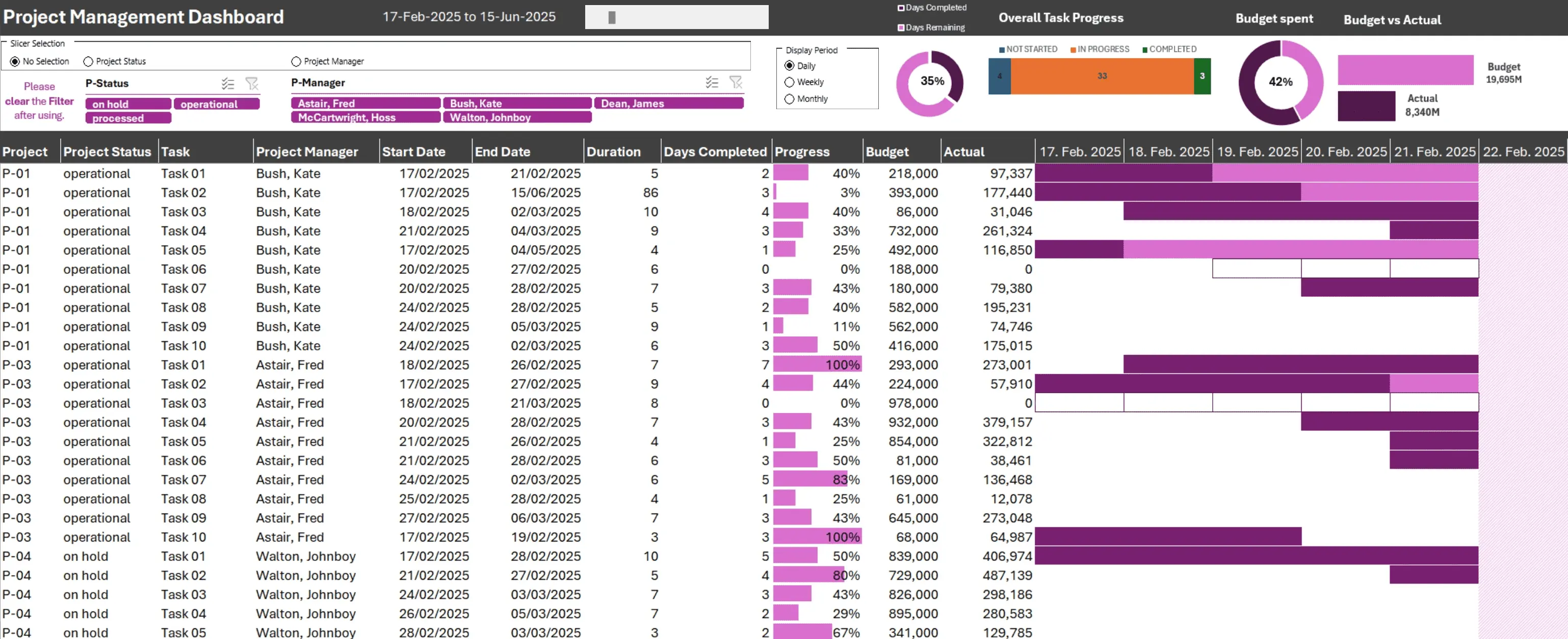
Plan it. Track it. Export it.
Your Gantt chart. Your dedicated environment. Zero data exposure.
Tasks, timelines, and budgets: structured, private, and always under your control. Watch how it works.
Need more? For detailed planning and advanced visualisation, SafeOffice is ready to prepare a personalised offline version for you.
Secure Access
Protection by Design.
Our secure infrastructure ensures that your data remains private and protected at all times.
Each client has a dedicated, isolated environment. Access is strictly controlled via secure authentication.
Please use the "Go to my project" link to sign in and view your documents.
We do not use external links or cookies. This means that we do not store any of your data. This approach goes hand in hand with the fact that the usual user-friendly functions cannot be used.

Precision Project Management: Everything You Need to Know Before You Get Started
Q: How does the integrated Budget Tracker prevent my project from bleeding money?
A: The portal instantly generates a timeline with tasks, a Gantt chart and a budget overview from a single template. Each task has its own cost estimate, and the budget view adds these up to give you a clear total, so you can see at a glance whether your project is staying within its budget or not.
For small projects, this is often all you need: a complete picture of what will be spent, when, and on what. For larger projects, the same output can be used to quickly provide stakeholders with a high-level overview of the key financial figures. You can export the result as a PDF, XLSX, SVG, PNG or self-contained HTML file. As all of these formats open without specialist software, there are no compatibility issues, workarounds or delays caused by people not having the right tools installed.
The access model matches this simplicity. You pay a one-off fee by bank transfer, receive a personal login, and can create as many projects as you need. There is no recurring subscription or usage cap.
When a project reaches the stage where month-by-month variance tracking between planned and actual costs becomes necessary, that level of detail requires a dedicated, custom-built spreadsheet, a different kind of tool entirely. The portal is designed to help you get started quickly and provide a reliable overview, while more granular tracking lives in a custom-built model that reflects your specific cost categories, approval workflows, and reporting periods.
See where every cent goes, before it's gone. Start with the snapshot, scale to full control.
Q: Can I use these Gantt charts for presentations to my board, investors or clients?
A: Yes, they are specifically designed for that purpose. The clean layouts, consistent formatting and visual hierarchy of the Gantt charts and budget overviews produced by the portal make the information immediately readable, whether it is projected on a screen, printed on paper or viewed as an email attachment.
There are five export options, each suited to a different presentation context. PDF is the universal handout: it looks identical on every device and prints reliably. SVG and PNG produce high-resolution images that can be embedded cleanly into slide decks or reports without pixelation. XLSX provides recipients with the underlying data if they wish to inspect or extend it. The HTML export is also worth highlighting: it produces a self-contained file that opens in any browser and renders the Gantt chart and budget with full fidelity, with no dependencies, plugins or special software required. For on-screen presentations, particularly when projecting in a meeting, HTML delivers the sharpest and most interactive results.
The practical benefit is speed. Rather than spending hours reformatting data into a separate presentation tool, you can simply export directly from the portal and share. Every project partner receives the same professional output within minutes, regardless of their operating system, software or technical ability.
For organisations that require recurring, highly detailed board reports, earned-value analysis, milestone-level variance tracking and multi-year trend visualisation, this type of reporting goes beyond template-based snapshots and requires modelling. It requires a custom-built spreadsheet designed around the metrics, categories and audiences that matter to your organisation.
Provide crystal-clear project overviews that command respect and build trust in any format and to anyone.
Q: Why choose this over a standard SaaS subscription like Monday.com or Asana?
A: There are three reasons: focus, cost structure and scalability without bloat.
Mass-market project management platforms are designed to serve millions of users and therefore carry hundreds of features to cover every possible use case. This results in a steep learning curve, a cluttered interface, and a monthly subscription that charges you for unnecessary capabilities.
This portal takes a different approach. It does three things — timeline, Gantt chart and budget overview — and does them immediately. You enter your tasks, the template generates the output and you can export it as a PDF, XLSX, SVG, PNG or HTML file. There is no maze of features to navigate, no permissions model to configure, and no team management layer forcing you to define roles before creating your first task.
The cost model is different, too. You pay a one-off fee by bank transfer, receive a personal login and can create as many projects as you like. There is no per-seat pricing, no annual commitment and no pressure to upgrade. The tool remains the same, whether you use it for one project or fifty.
When a project genuinely outgrows what a template can deliver and you need detailed task dependencies, resource levelling, earned-value tracking or a live Kanban board, you do not have to upgrade to a higher, more expensive tier full of unnecessary features. Instead, a purpose-built spreadsheet is modelled around your actual workflows, including your categories, approval chain and reporting rhythm. This is a fundamentally different scaling model. You move from a focused tool to a bespoke tool rather than from a generic platform to an expensive version of the same thing.
Not a shared platform with a thousand features you'll never use. It's a focused tool and a bespoke solution when you need more.
Q: I manage highly sensitive corporate data. Can competitors or search engines find my project?
A: No, the portal is built on a privacy-first architecture that eliminates exposure by design rather than through settings.
There are no external links on the page, and nothing calls out to third-party services, analytics platforms or social networks. There are no cookies. There are no tracking scripts. As a result, no external system ever learns that your project exists, let alone what it contains. Search engine crawlers cannot find project data because there is nothing for them to index: no public URLs, sitemaps or metadata leaking through embedded resources.
Each client environment is fully isolated. Access is controlled through secure authentication. Your login takes you to your projects and nowhere else. There is no shared workspace and no collaborative layer that could accidentally surface data to another user. There is also no admin dashboard that aggregates activity across accounts.
When you export your work as a PDF, XLSX, SVG, PNG or HTML file, the files are stored on your local hardware. They do not pass through a cloud storage layer, nor are they cached on a CDN or backed up to a server that you do not control. From that point on, the data is entirely subject to your own security policies.
For organisations handling particularly sensitive work, such as mergers and acquisitions, R&D roadmaps, litigation strategy and grant applications, this architecture means the project overview can exist in a controlled environment, never being exposed to the broader internet. For those who require an additional layer of security, fully offline spreadsheet solutions are also an option: self-contained workbooks that run entirely on local machines with zero network dependency.
True privacy is not a feature toggle — it is the foundation on which everything else is built.
Q: How quickly can my team actually start using this?
A: The onboarding time is essentially zero. Pay by bank transfer, receive your personal login credentials, and log in. The portal then presents the template immediately. You can then enter your tasks, assign dates and costs, after which the Gantt chart and budget overview will be generated in real time. There is no configuration wizard, workspace setup or role-and-permission architecture to define before you can begin.
Exporting is equally fast. Choose PDF for a universal handout, XLSX if the recipient needs the raw data, SVG or PNG for embedding into other documents or HTML for the cleanest on-screen presentation. Every format opens without specialist software, which eliminates the most common cause of delays in project communication: receiving a file that cannot be opened.
This is particularly important for cross-organisational projects. When your project partners, contractors or clients use different operating systems, different office suites or different internal policies about what software they are allowed to install, universally readable export formats are not a convenience, they are a necessity. The portal produces these formats, ensuring that key data reaches everyone who needs it without delay.
If your project grows to the point where you need detailed task dependencies, variance reports, resource tracking or a live Kanban board, you won't have to start again. A custom-built spreadsheet can be modelled to pick up exactly where the portal left off: same task structure, same cost categories and same project logic, but with the ability to be extended into a deeper, more granular tool.
No setup theatre. Log in, export, share. Your project data will reach everyone who needs it in minutes, not weeks.
Q: Am I locked into a cloud subscription forever?
A: No, and the portal has been designed to prevent that kind of dependency.
You can export every project you create locally as a PDF, XLSX, SVG, PNG or HTML file. Once exported, the files are stored on your device. You don't need the portal to open them, an active subscription to access them, or anyone's permission to share them. The data is yours, and it is in a format that works independently of the tool that created it.
The access model reinforces this. You pay a one-off fee by bank transfer, receive a single personal login and can create as many projects as you need. There are no recurring subscriptions, automatic renewals, price increases after a trial period or moments when your data becomes inaccessible because a payment has lapsed. The relationship is transactional in the purest sense: you pay for access, you get access, and you keep everything you produce.
The same principle of ownership applies to complex projects that require a tool with deeper capabilities, such as detailed timeline modelling, budget-vs.-actuals tracking and Kanban workflow management. You can build a self-contained, offline spreadsheet to your specifications: a workbook that runs entirely on your own machines, stores nothing externally, and is yours to keep. There is no vendor lock-in, no server dependency and no terms of service that grant a third party rights over your data.
Own your tools. Own your data. Export today and go fully offline tomorrow.
Q: Can I import a Google Spreadsheet directly?
A: Yes, it's technically possible. However, I've chosen not to offer it for a reason.
When my server fetches a file directly from Google, Google can see my server's IP address, which spreadsheet was requested and when. This constitutes a third-party connection, which goes against the core principle on which this entire system is built: your data stays between you and me, with no one else involved.
The alternative is simple and takes about ten extra seconds:
- Open your Google Sheet.
- Go to File > Download > Microsoft Excel (.xlsx).
- Upload the file to the SafeOffice project management system.
That's it! The data flows like this: Google → your machine → my server. My server never contacts Google. I receive a plain Excel file and have no way of knowing, or any reason to care, that it originally came from Google Sheets.
Your relationship with Google remains between you and Google. Your relationship with me stays between us.
I believe those ten seconds are worth it!
Your data. Your rules. No detours.
Related Resources
If you want to delve deeper, whether to understand how detailed budget tracking works in practice or to explore a custom-built solution for your organisation, you may find these two resources useful.
Understanding budget vs. actuals tracking: a four-part article series that walks through a real project management workbook, covering how a cost baseline is constructed, how actual costs are tracked against it and how variances are automatically identified. Although it is a technical deep dive aimed at advanced Excel users, the underlying principles can be applied to any structured budget tracking approach.
→ Read the series on the SafeOffice HelpMe portal
Custom project management solutions
For projects that require more than a template, such as detailed Gantt charts with task dependencies, bespoke budget trackers, Kanban boards or offline-capable workbooks, SafeOffice offers a consulting and modelling service. Each solution is tailored to your specific workflows, categories, and reporting needs.
→ Learn more at safeoffice.de